Proving Managed XDR value in one click
Simplify QBRs with on-demand reporting inside BarracudaONE
Takeaways
- BarracudaONE simplifies quarterly business reviews by enabling on-demand reporting for Managed XDR, saving time and reducing manual effort.
- Reporting efficiency is greatly improved, allowing MSPs and lean security teams to present business outcomes without scrambling for data across multiple consoles.
- The Value Report inside BarracudaONE provides a current, executive-ready snapshot of security operations, making it easy to answer common QBR questions and demonstrate return on investment.
- Stakeholders can quickly and consistently review Managed XDR outcomes, ensuring transparency and clarity in business reviews.
Quarterly business reviews (QBRs) and the like can turn into a familiar scramble. You pull screenshots from multiple consoles and translate technical activity into business outcomes. Then build a narrative that justifies security spend. It’s necessary, but if we’re honest, it’s a pain the neck.
The problem isn’t a lack of work being done. It’s that the proof is scattered. That’s why bringing Barracuda Managed XDR visibility and reporting into BarracudaONE is such a big win for reporting efficiency — especially for MSPs and lean security teams that need a repeatable process.
Outcomes matter, but evidence is fragmented
In a typical quarter, you might be asked:
- “Are we fully deployed and integrated?”
- “Are we seeing anything urgent?”
- “What did we actually get for what we paid for?”
Each question is totally reasonable. But answering them usually requires context switching across tools. There’s a lot of manual assembly.
The BarracudaONE Value Report
Inside BarracudaONE, the on-demand Value Report turns day-to-day security operations into an executive-ready artifact you can use for effective business reviews. Instead of building a custom deck or spreadsheet every quarter, you can generate a current snapshot of Managed XDR outcomes any time you want (see Figure 1 below). When you do, you can walk interested stakeholders and management through what’s happening across the environment — quickly, consistently and on demand.
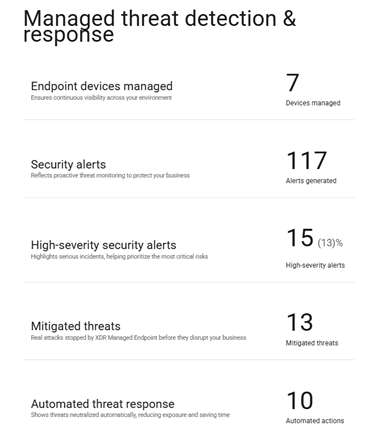
Figure 1. Barracuda Managed XDR Value Report in BarracudaONE
It’s also worth noting: The XDR Value Report is part and parcel of a wider set of value reports available in BarracudaONE. So, while this post focuses on Managed XDR, you have the opportunity to standardize reporting across solutions. With just a click, you can use this same approach to translate technical metrics into business value for your other Barracuda products.
If you’re an MSP, this further supports renewals and expansion conversations. It changes your workflow from “report building” to “value storytelling.”
But don’t report on value until you confirm health
QBRs are the wrong time to discover an onboarding gap. Before you present outcomes, validate the basics: Is everything connected and healthy?
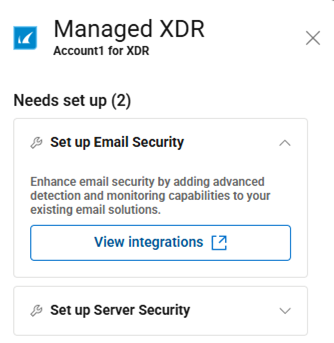
Figure 2. User needs to set up XDR Email Security and XDR Server Security
In BarracudaONE, you can check the health of your Managed XDR setup and integrations across your XDR solutions (i.e., endpoint, server, network, email, and cloud), with visibility into common integration concerns such as log ingestion and log monitoring.
For MSPs managing multiple customer deployments, this is the difference between reacting to surprises and running a proactive cadence.
High-severity alerts where you already work
Another common reporting pain point is the “So what’s urgent right now?” question.
With high-severity security alerts visible directly on the BarracudaONE home page (see Figure 3 below), MSPs and customers can stay oriented across multiple Barracuda products without switching between separate dashboards. You get a single place to spot what needs attention now.
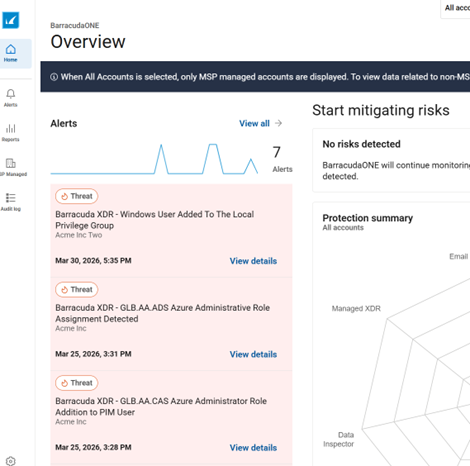
Figure 3. Example of high-severity alerts on the BarracudaONE homepage
If and when you do need to investigate, you can seamlessly drill into the Managed XDR experience for deeper context and response. The result is less context switching and faster alignment, especially when you’re managing multiple customers or environments, many of which may have multiple Barracuda deployments.
A simple QBR cadence that scales
Here’s a lightweight process you can run ahead of every customer QBR:
- Log into BarracudaONE and view the Managed XDR tile at the bottom of the home page, which is visible alongside other Barracuda solutions.
- Review setup and integration health across your or your customer’s XDR products.
- Check high-severity alerts from the BarracudaONE home page. Drill in as needed.
- Generate the on-demand XDR Value Report and use it as the stakeholder-friendly QBR summary.
- If applicable, select additional BarracudaONE Value Reports to broaden the value story beyond XDR (e.g., add Email Protection).
Test it out now (it only takes a couple minutes). You’ll have a ready-to-use baseline you can revisit anytime. Then your next QBR can stay focused on outcomes, not evidence gathering.






Subscreva o Blogue Barracuda.
Inscreva-se para receber destaques sobre ameaças, comentários do setor e muito mais.